
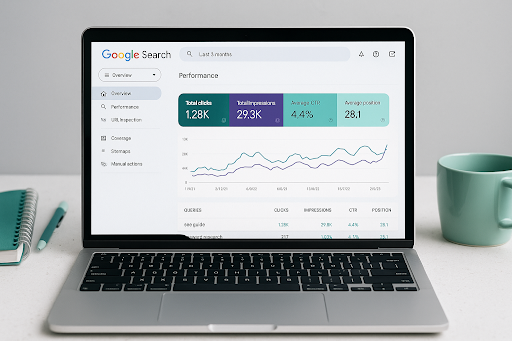
Google Search Console (GSC) is a powerful, free tool provided by Google that offers invaluable insights into a website’s SEO performance.
It helps site owners, developers, and marketers track their website’s health, fix errors, and optimize content for better search engine rankings. When conducting an SEO audit, GSC is one of the first tools to use, as it gives direct access to Google’s view of your site.
This guide will explore how to use Google Search Console for SEO audit and how the data it provides can be used to enhance your website’s search engine optimization.
6 Steps to Use Google Search Console for a Quick and Effective SEO Audit
Google Search Console (GSC) is a free and powerful tool that helps you monitor, maintain, and troubleshoot your site’s presence in Google Search results. Here’s how to use it to perform a basic but insightful SEO audit.
1. Check Index Coverage
Review the Coverage report to see which pages are indexed, which are excluded, and why. Look for pages with crawl errors, redirect issues, or those marked as “noindexed” unintentionally.
2. Inspect URL Performance
Use the URL Inspection Tool to check the crawl and index status of specific pages. This is useful for verifying whether your important content is accessible and indexed correctly.
3. Analyse Search Performance
Go to the Performance tab to evaluate clicks, impressions, CTR, and average position. Identify high-impression but low-CTR pages to optimise titles and descriptions, or target underperforming keywords.
4. Identify Mobile Usability Issues
In the Mobile Usability report, check if any pages have mobile-specific problems like text too small to read, clickable elements too close, or viewport configuration issues.
5. Review Core Web Vitals
Visit the Core Web Vitals report under the “Experience” section to assess your site’s page speed and loading experience across mobile and desktop. Fix issues like poor LCP, FID, or CLS scores.
6. Monitor Security and Manual Actions
Check the Security Issues and Manual Actions sections to ensure your site isn’t penalised or affected by malware, hacking, or spam-related issues.
Tracking SEO Improvements Using Google Search Console

After you’ve completed your audit and implemented fixes, it’s essential to monitor the results. Google Search Console offers several metrics that help you measure progress over time.
- Use the Performance tab to track changes in clicks, impressions, CTR, and average ranking position.
- Check the Coverage and Enhancements reports to see if previous issues, like errors or mobile usability problems, have been resolved.
- Monitor Core Web Vitals regularly to ensure user experience metrics continue to improve after technical fixes.
By comparing before-and-after data, you can assess which changes had the greatest impact and identify areas that still need attention.
Integrating Google Search Console with Other SEO Tools
While Google Search Console (GSC) offers a robust view of your website’s search performance, combining it with other SEO tools can significantly enhance your audit process.
These integrations provide deeper insights, help validate data, and support more informed decision-making.
Combine GSC with Google Analytics for Full-Funnel Insights
Google Analytics and GSC work best when used together. While GSC shows how users find your site through search, Analytics tracks what they do once they arrive.
By comparing landing page performance, bounce rates, and conversion data with search query impressions and clicks, you can uncover what’s working—and what’s not—across the entire user journey.
Use SEO Tools Like Ahrefs, SEMrush, or Screaming Frog
Pairing GSC with external tools like Ahrefs, SEMrush, or Screaming Frog helps validate and expand your audit. These platforms allow you to:
- Compare backlink data with GSC’s link reports
- Perform in-depth crawl diagnostics and uncover technical SEO gaps
- Identify keyword opportunities and competitive benchmarks
They also provide historical data and visibility trends that complement GSC’s search-focused metrics.
Visualise Your Data with Looker Studio Dashboards
Formerly Google Data Studio, Looker Studio enables you to create custom dashboards that pull in data from GSC and other tools. These dashboards help:
- Track SEO KPIs over time
- Share progress with stakeholders
- Simplify complex data for quick decision-making
Integrating GSC with Looker Studio allows for real-time monitoring and easy visualisation of performance trends, making your SEO reporting more efficient and impactful.
Advanced Tips for Using Google Search Console for SEO Audits

Beyond the basics, Google Search Console offers advanced features that can reveal deeper SEO insights. Use these tips to uncover hidden issues and identify new optimisation opportunities.
1. Link Analysis via External Links Report
The External Links Report shows which external websites are linking to your pages.
Quality backlinks are a strong ranking factor, and understanding your link profile can reveal opportunities for further link-building.
2. Internal Linking Insights
Google Search Console offers insights into your internal linking structure.
A healthy internal linking strategy helps distribute link equity across your site and ensures important pages are easily accessible.
3. Refining Search Queries and Keyword Targeting
By examining the search queries report, you can identify which keywords drive traffic to your site and their average position.
This helps refine your keyword strategy and focus on the terms with the highest potential for growth.
Make the Most of Google Search Console in Your SEO Audit
Google Search Console is a must-have tool for anyone conducting an SEO audit. It provides invaluable insights into technical SEO, user experience, and search performance.
Regularly monitoring and interpreting GSC data will help optimize your site’s SEO and ensure it stays competitive in the search rankings.
After performing your audit with GSC, implement the recommended fixes, and monitor your site’s performance regularly to track progress and continue improving.
Need expert help interpreting your data or implementing changes? Partner with a trusted SEO agency to turn insights into long-term results.